🏁
Giveaway ended
This giveaway has already ended. You can no longer join it.
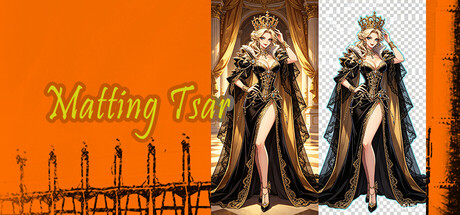
Matting Tsar
🏁 ENDED
📝 Description
Matting Tsar is not a game, it's a highperformance image matting tool based on deep learning, developed by small studio. If you've ever struggled with removing backgrounds from photos, this is the utility that promises to make it effortless. Drag and drop an image, click one button, and the background is gone. It also supports rectangular and free lasso selections for precise local matting, and it integrates directly into your Windows rightclick menu for silent, oneclick background removal or quick import into the software for finetuning.
The core workflow is built around simplicity. You drag an image into the application window, hit the "Matting" button, and the software automatically removes the background, saving the result as a transparent PNG in the same folder with a timestamped filename for easy tracking. If you need more control, you can switch to selection mode draw a rectangle or a free lasso around the area you want to matte, and the software applies the selection mask automatically. When no selection is made, it defaults to matting the entire image.
What makes it stand out is the Windows rightclick menu integration. After installation, you can rightclick any image file and choose "Oneclick automatic matting" to process it silently without even opening the software interface, or "Import into software for local matting" to launch the app and load the image for finetuning. The menu supports both traditional and Windows 11 newstyle rightclick menus, and you can add or remove the integration with a single click from within the software no forced installation, and after the first adminpermission setup, no further elevation is needed.
The software supports 42 languages, with a language selection dialog appearing on first run. It runs on an ONNX inference engine for high quality and efficiency, and also supports commandline parameters for integration with other tools or scripts. The developer openly discloses that some store page and library assets are AIgenerated, which is a transparency note rather than a gameplay concern.
It was released on July 24, 2026. The system requirements are modest: Windows 10, an Intel Core i58265U or AMD Ryzen 7 2700U, 4 GB RAM, and 2 GB of storage space. The recommended specs bump that up to Windows 11, an Intel Lunar Lake Ultra 5 238V or AMD Ryzen AI 7 350, and 16 GB RAM.
The reception so far is tiny the software currently has only 3 user reviews on Steam, so there's no real consensus yet on how it performs longterm. It's not a game in any traditional sense; it's a utility tool that happens to be distributed through Steam.
Who's it for?
If you regularly need to remove backgrounds from images whether you're a designer, a content creator, an ecommerce seller, or just someone who wants clean product photos this is a cheap, nononsense tool that could save you a lot of time. If you appreciate software that integrates directly into your workflow via rightclick menus and commandline support, it's designed with that kind of efficiency in mind. It's also for anyone who wants to support a small indie studio making practical tools rather than games. And if you just want a lightweight, affordable background remover that doesn't require a subscription or cloud upload, this one's worth a look.
But if you're looking for a game to play, you should look elsewhere this is a utility, not entertainment.
The core workflow is built around simplicity. You drag an image into the application window, hit the "Matting" button, and the software automatically removes the background, saving the result as a transparent PNG in the same folder with a timestamped filename for easy tracking. If you need more control, you can switch to selection mode draw a rectangle or a free lasso around the area you want to matte, and the software applies the selection mask automatically. When no selection is made, it defaults to matting the entire image.
What makes it stand out is the Windows rightclick menu integration. After installation, you can rightclick any image file and choose "Oneclick automatic matting" to process it silently without even opening the software interface, or "Import into software for local matting" to launch the app and load the image for finetuning. The menu supports both traditional and Windows 11 newstyle rightclick menus, and you can add or remove the integration with a single click from within the software no forced installation, and after the first adminpermission setup, no further elevation is needed.
The software supports 42 languages, with a language selection dialog appearing on first run. It runs on an ONNX inference engine for high quality and efficiency, and also supports commandline parameters for integration with other tools or scripts. The developer openly discloses that some store page and library assets are AIgenerated, which is a transparency note rather than a gameplay concern.
It was released on July 24, 2026. The system requirements are modest: Windows 10, an Intel Core i58265U or AMD Ryzen 7 2700U, 4 GB RAM, and 2 GB of storage space. The recommended specs bump that up to Windows 11, an Intel Lunar Lake Ultra 5 238V or AMD Ryzen AI 7 350, and 16 GB RAM.
The reception so far is tiny the software currently has only 3 user reviews on Steam, so there's no real consensus yet on how it performs longterm. It's not a game in any traditional sense; it's a utility tool that happens to be distributed through Steam.
Who's it for?
If you regularly need to remove backgrounds from images whether you're a designer, a content creator, an ecommerce seller, or just someone who wants clean product photos this is a cheap, nononsense tool that could save you a lot of time. If you appreciate software that integrates directly into your workflow via rightclick menus and commandline support, it's designed with that kind of efficiency in mind. It's also for anyone who wants to support a small indie studio making practical tools rather than games. And if you just want a lightweight, affordable background remover that doesn't require a subscription or cloud upload, this one's worth a look.
But if you're looking for a game to play, you should look elsewhere this is a utility, not entertainment.
🔒 Access requirements
- 🎮 Required Steam level: 1+ (users with level 0 cannot participate)
- 🌍 Access for everyone: ✅ Yes
👑 Created by
 404FS
⭐8
404FS
⭐8
404FS
⭐8
💰 Entry cost
1 points
📅 Start date
28.07.2026 22:47
📅 End date
12.08.2026 22:47
⏰ Time left
⏳ giveaway_loading
🎁 Giveaway type
🔑 Steam Key (10 pieces)
👥 Number of participants
29
Giveaway ended























Thanks
Thank you!
Thank you!
Thanks!
Thank you!